10 releases · November 16 – 22, 2026

What shipped November 16 – 22, 2026

Highlights

  • App Store and web prices side by side
  • Budget Actual never goes negative
  • One Accounts card per bank
v1.68.0

Subscribe from your iPhone with Apple

You asked for a way to subscribe without leaving the iPhone app. Now there is one, and the cheaper web price is still right there if you want it.

Subscriptions

  • The iPhone app's plan card shows the App Store price and the Copia web price side by side. Subscribe with Apple in a tap, or pay on the web and save 30% on monthly and 33% on yearly.
  • A subscription bought on your iPhone unlocks Copia everywhere, including the web app.
  • Restore purchases brings back an Apple subscription on a new phone, and Manage opens your Apple subscription settings.
  • On the web, an Apple subscription shows as billed by Apple, with a note to manage it on your iPhone.
  • Deleting your account now warns you first that an App Store subscription keeps renewing until you cancel it in iPhone Settings.

Bank linking

  • Banks connected through MX start syncing your transactions as soon as you finish connecting.
  • Reconnecting an MX bank you removed earlier no longer fails.

Dashboard

  • The Account balance widget shows a faded sample chart before your first transaction, like the other dashboard widgets.

Website

  • The compare page keeps the app names pinned at the top of the table while you scroll.

Subscribing with Apple and the dashboard sample chart reach the iOS app with the next App Store build (1.68.0).
v1.67.0

Steadier budget totals, sourced comparisons

A small release that makes the numbers you lean on easier to trust, in your budget and on our own website.

Budget

  • A deposit or card payment filed under Uncategorized no longer lowers your Actual, so Actual, Remaining, and the Uncategorized row can't go negative.
  • An uncategorized card payment counts toward its card's debt row again.

Mina

  • Mina's replies show formatted text only. Pictures and page code inside quoted transaction or receipt text are no longer shown.

Privacy

  • What you type into a form that is still open, like an account's name or balance, stays out of the analytics and error reports we collect.

Website

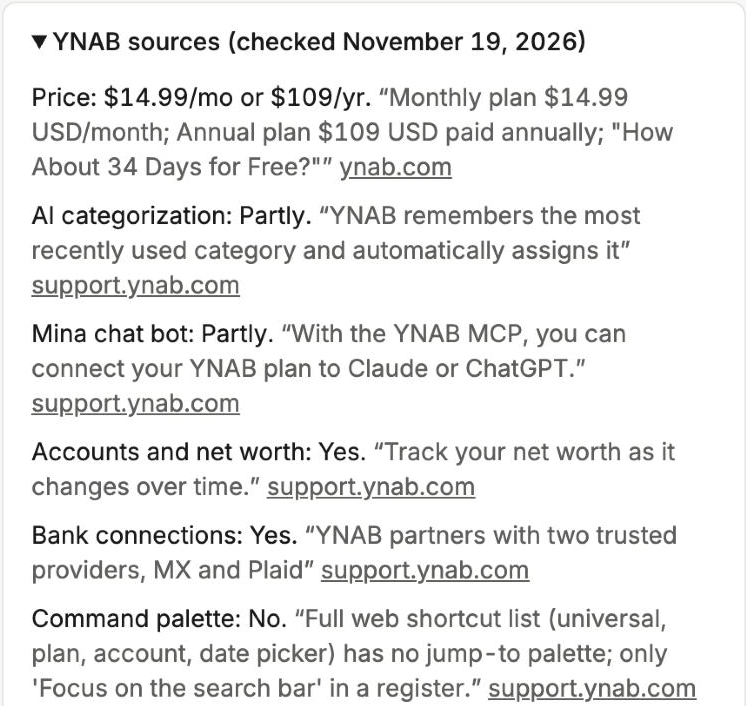
  • Every competitor price and feature on our comparison pages links to the page we found it on, with a sources list under each table.
  • Prices and features are updated for YNAB, Monarch, Copilot, Rocket Money, EveryDollar, Simplifi, and Goodbudget.

The YNAB sources list on the Copia vs YNAB page, quoting YNAB's own pages for each price and feature with a link to each source

The Mina change reaches the iOS app with the next App Store build (1.67.0).

v1.66.0

One card per bank, calmer Catch-up

Two things got quieter and tidier this time: your accounts, and the card that catches you up.

Accounts

  • A linked bank and the accounts you add by hand at the same bank now share one card.
  • Each account is marked as synced or manual.
  • A manual account can move to another bank from its Edit screen.

Catch-up

  • Catch-up on the dashboard opens only when there is real news, at most once a day, and closing it counts as seen.
  • It can tell you about budget check-ins, savings goal milestones, bills that changed price, categories we were not sure about, receipts we could not read, and what is new in Copia.
  • You choose how often it opens in dashboard settings.

Photo import

  • Card statements that print dates without a year are read correctly, and each row lands on the right year.
  • Card payments and credits import as money in.

The Accounts and Catch-up changes reach the iOS app with the next App Store build (1.66.0).

v1.65.1

Fewer false bills in Recurring

Recurring

  • Stores you simply visit often, like a grocery store or coffee shop, no longer show up as bills because two visits happened to cost about the same.
  • A quarterly bill now shows up once it has charged you three times, and a new monthly bill once two charges match in price.
v1.65.0

Emails when your account needs you

Some things you need to hear about even when you are not looking at Copia. Now we tell you by email, and only about your own account.

Account emails

  • When a bank connection breaks in a way only you can fix, like a changed password or a new security step, we email you to reconnect it. Temporary hiccups on the bank's side no longer send you anything.
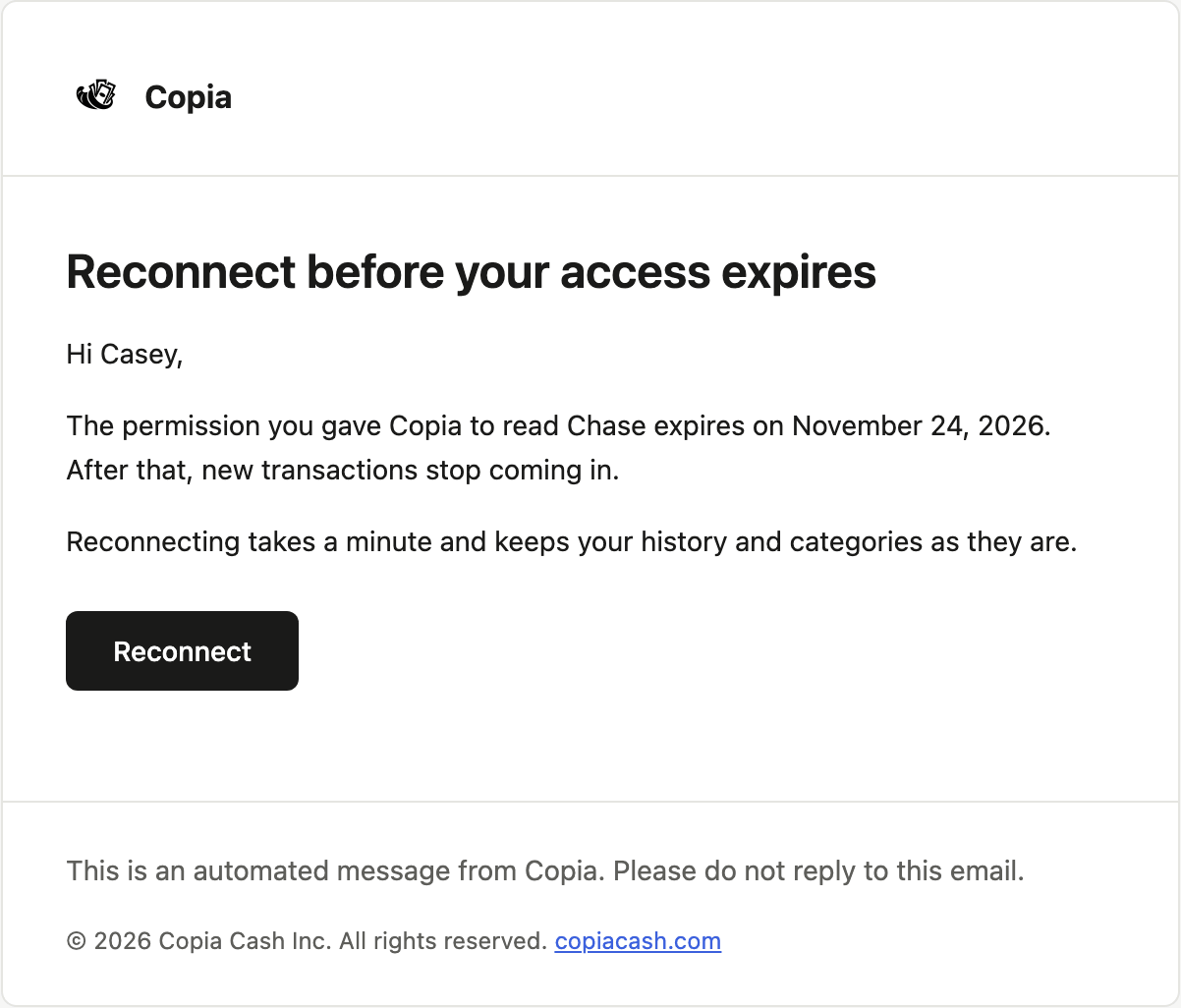
  • About a week before the access you gave Copia to a bank runs out, we email you so new transactions keep coming in.
  • We email you when a payment fails, a few days before your free trial ends, and before a yearly plan renews, so a charge is never a surprise.
  • You also get a welcome email when you sign up, a confirmation when you cancel, and one when you delete your account.

An email from Copia titled Reconnect before your access expires, with a Reconnect button

Recurring

  • A new membership whose first charge was smaller because it started mid-month now shows up as a bill.
  • A yearly fee whose price goes up at renewal stays one bill instead of splitting in two.
  • Bills on a bank connection that stopped syncing no longer end while its transactions are missing.

Mina

  • When you ask Mina about loan rates, inflation, gas prices, or national savings and card averages, the figures no longer go missing for a day when the government source is briefly down.

Website

  • copiacash.com loads faster.
  • Comparison, help, and change log pages are linked from the bottom of every page, and help articles show a preview card when you share them.
v1.64.0

Mina edits your transactions

Mina could already add new transactions. Now she can tidy up the ones you have. Mobile changes arrive with app version 1.64.0.

Mina

  • Ask Mina to add or change a note on a transaction, like "add a note to my Ikea purchase: new desk chair". She finds the transaction and shows you the note before saving it, including any note it replaces.
  • Mina can also rename a transaction, change whether it counts as an expense, income, a transfer, or a debt payment, and add or remove tags.
  • Nothing changes until you confirm. Amounts and dates stay as your bank reports them.

Bank linking

  • Reconnecting a bank no longer adds a second copy of every past transaction. Your history stays as it was, and new transactions keep arriving.

Recurring

  • Recurring finds your bills more reliably. A bill paid a day early, two identical charges on the same day, a utility with uneven history, or a price change no longer hides or ends a bill.
  • Credit card payments no longer show up as bills.
v1.63.0

Budget totals that add up

This release is mostly about trust in one number: what your budget says you spent. Mobile changes arrive with app version 1.63.0.

Budget

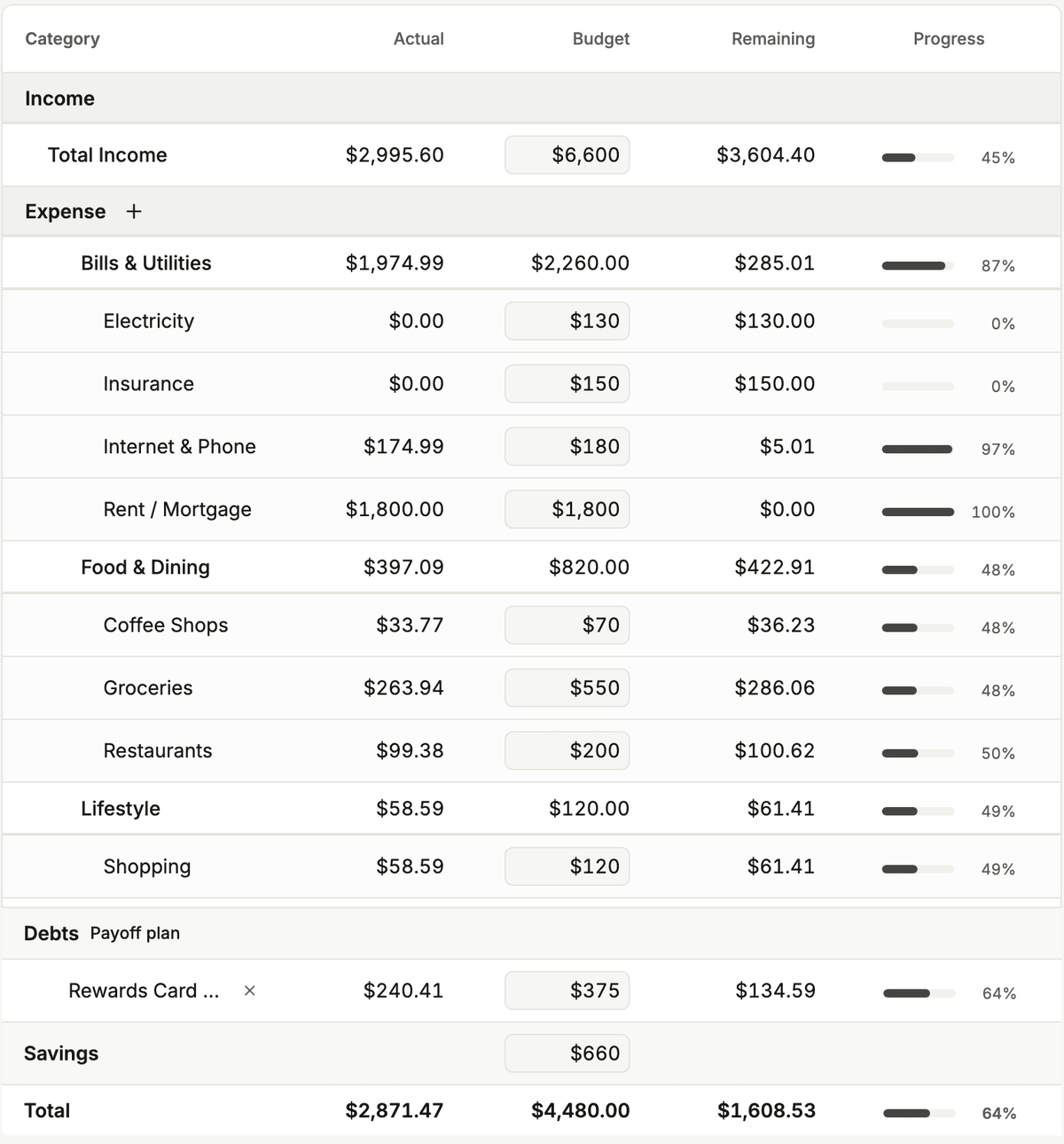
  • Paying off a credit card no longer counts your spending twice. Each purchase counts once in its category, and a card on your Debts list shows only what you paid down beyond that month's charges.
  • Actual now counts every expense, including categories you haven't budgeted, and refunds lower your spending everywhere, including the history chart and "vs last month".
  • Categories you turned off for the month stay out of Actual and Total budget. They still show what they spent under Inactive.
  • A hidden debt amount no longer inflates Total budget.
  • Copying a month brings over that month's amounts and savings plan, and savings goals plan only what is left to save.
  • A month holds one budget, even when you open it on several devices at once, and opening a month from before you started no longer creates an empty budget.

The budget table for November, with a credit card under Debts showing only what was paid down and one Total for the month

Forms

  • Adding an account, a transaction, or feedback keeps Save enabled and shows a message under each field that needs attention, instead of a button that won't press.

Recurring

  • The Recurring table shows each merchant's logo again, the same one you see when you open a charge.
  • A bill that changed names, like a gym that switched how it bills you, stays one bill when its next charge runs late, instead of splitting into two.

Android

  • The Android app is getting ready for Google Play: it has the Copia icon, and signing in brings you back to the app.
v1.62.0

Choose which emails you get

You can now decide which emails we send you, and the categories you fix stay fixed. Mobile changes arrive with app version 1.62.0.

Email

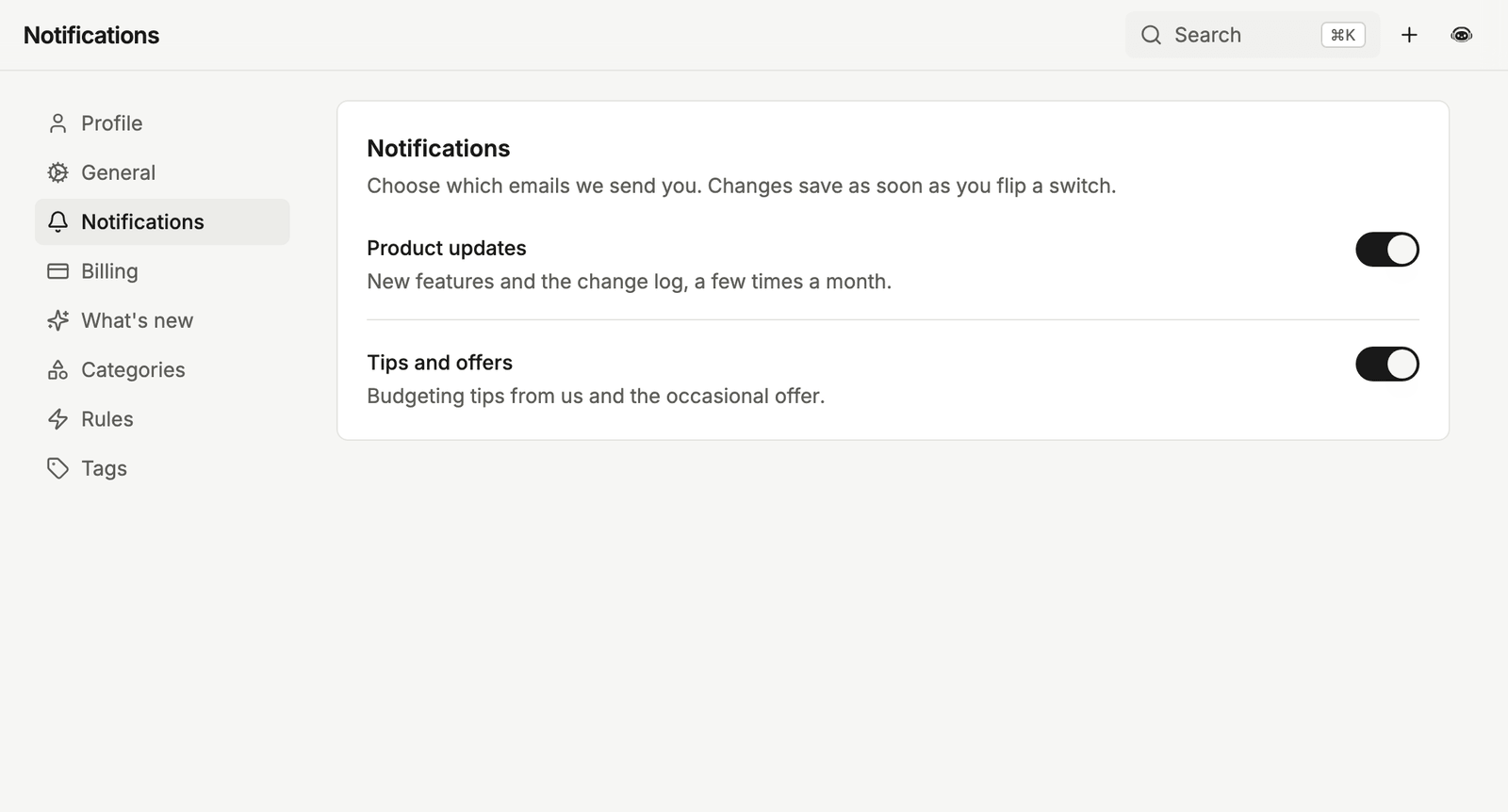
  • Settings has a new Notifications page with a switch for product updates and one for tips and offers. Changes save as soon as you flip a switch.
  • Every update or offer email has an unsubscribe link at the bottom that works without signing in, and your mail app's own Unsubscribe button works too.
  • Emails about your account, billing, security, and bank syncing still always arrive.

The Notifications page in Settings, with switches for product updates and for tips and offers

Transactions

  • A category or merchant you change now stays put when your bank updates that transaction.
  • A pending charge no longer counts twice after it posts.
  • Venmo, PayPal, and other payment-app transfers land in Transfers instead of Uncategorized.

Budget

  • A refund or statement credit on a credit card no longer counts as a payment toward that card, so Total Actual and Remaining stay right.

Improvements

  • Nightly jobs, such as refreshing recurring bills and Mina's market rates, now run every night instead of sometimes skipping days.
  • Steps that run in the background after you act, such as emails and receipt processing, now retry on their own, so one failing step no longer makes another give up early.
v1.61.3

Credit cards add up right

More fixes for credit cards, and a smarter Recurring list. Mobile changes arrive with app version 1.61.3.

Accounts

  • A credit card you paid past zero now shows as a credit instead of debt.
  • Editing a card that is in credit no longer turns its balance into debt.
  • Adding or editing an account now tells you when the last 4 digits are incomplete, instead of holding Save with no message.

Payoff

  • Changing a card's interest rate or minimum payment now saves the number you typed. Before, it could keep the old value when you left the field.

Budget

  • Budget totals now count what you paid toward debts, not just what you planned.
  • A debt's actual is the money you paid into that account, so new card purchases no longer cancel out a payment.

Recurring

  • A paycheck or bill stays one item when its amount changes, such as a smaller paycheck after a benefits update.
  • Subscriptions paid through PayPal now show up in Recurring.

Website

  • The Copia vs Copilot page no longer says an Android app is in progress.
v1.61.2

Clearer card checks and fresh Mina rates

A small round of fixes. Mobile changes arrive with app version 1.61.2.

Accounts

  • Adding or editing a credit card now flags a negative minimum payment or an interest rate over 100% right under the field, instead of failing to save with an unclear error.

Mina

  • Savings, CD, and credit card rates refresh again, so Mina compares your accounts against current offers.
  • Mina lists only offers that fit what you asked about, and links only the pages each offer came from.
  • Mina compares offers against official national averages from the FDIC and the Federal Reserve, with the date and a link, instead of a figure read off a web page.

Website

  • The About page lists Angel as Co-Founder and CEO and Dillon as Co-Founder and CTO.

See every release